Push-to-talk radio apps, phone calls and voice notes all squeeze speech through a narrow pipe, and the first thing the pipe throws away is the top end. What is left is intelligible but dull: the s and sh sounds lose their hiss, the breath and the air around a voice disappear, and the talker sounds like they are in the next room. We wanted a way to put some of that back, in the browser, with no binary to load. So we wrote one and we are releasing it: sbr-crystalizer.js, MIT licensed, on GitHub.
What goes missing, and what we do about it
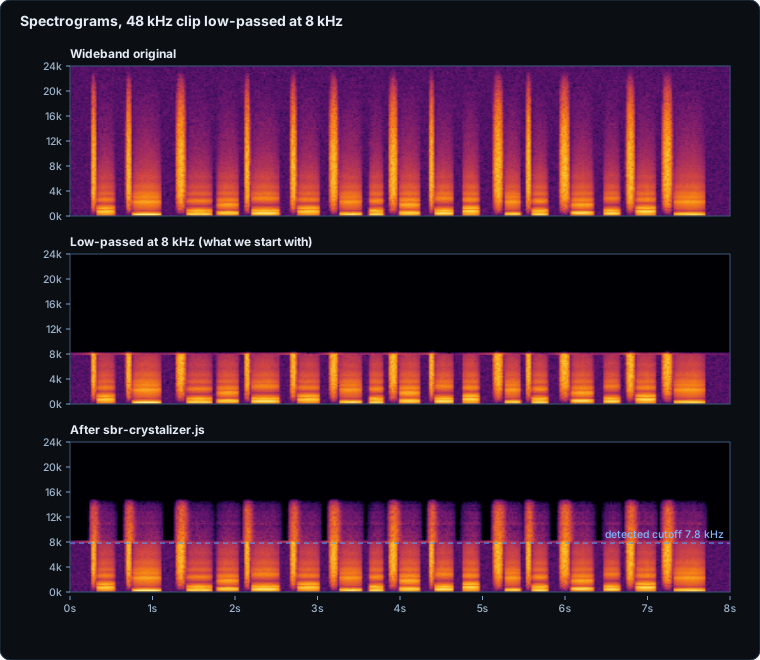
A recording that went through a low-bitrate codec, a telephone line or a sloppy resampler usually has a hard ceiling: nothing above, say, 8 kHz. Speech has plenty to say above that, mostly noise-like sounds (fricatives, breath), which is exactly the kind of content that is easy to imitate convincingly. The idea, known in codecs as spectral band replication (it is how HE-AAC gets its sparkle at low bitrates), is to look at what is just below the ceiling and build a band above it that has a similar level and a speech-like fall-off.
Codecs do that at the encoder's request, from hints. We do it blind, on a finished file: the library finds the ceiling by itself, so you can hand it any clip.
Using it
<script src="sbr-crystalizer.js"></script>
<script>
  // channels: Float32Array[] (for example from AudioBuffer.getChannelData)
  const r = await sbrCrystalizer.process(channels, sampleRate);
  if (r.applied) play(r.channels, r.sampleRate);   // otherwise r.channels is your input, untouched
</script>
It is one file with no dependencies and no DOM access, so it also runs in a Web Worker, an Android WebView and Node, with an ES-module build alongside. It is asynchronous so a long clip does not freeze a page, and it accepts an abort signal. The options are few: a manual cutoff, how loud and how steep the new band is, and a switch to output at double the sample rate so a 16 kHz clip has somewhere to put its new top end.
How it works
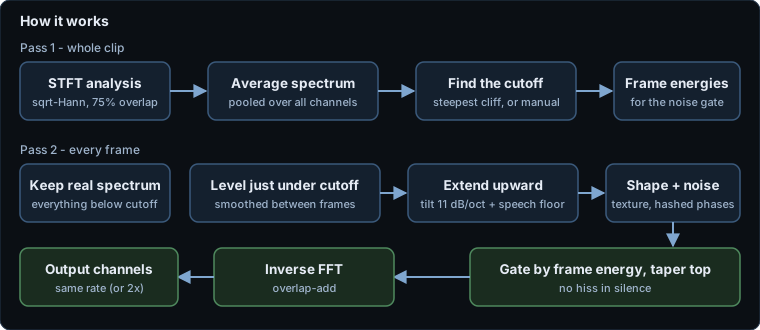
Pass one reads the whole clip and finds the ceiling: the steepest cliff in the average spectrum. Pass two goes frame by frame. Everything below the ceiling is copied through unchanged. Above it, the library measures the level just under the ceiling, extends it upward with a speech-like downward slope and a long-term speech-spectrum floor (so a codec's hollow top is not left hollow), shapes it with the texture of the band just below, gives it pseudo-random phases so it behaves like noise, switches it on only when the frame is loud enough to be speech rather than room noise, tapers the very top, and transforms back. The "random" phases are a hash of the frame and bin number, so the same clip always produces the same samples.
When it does nothing
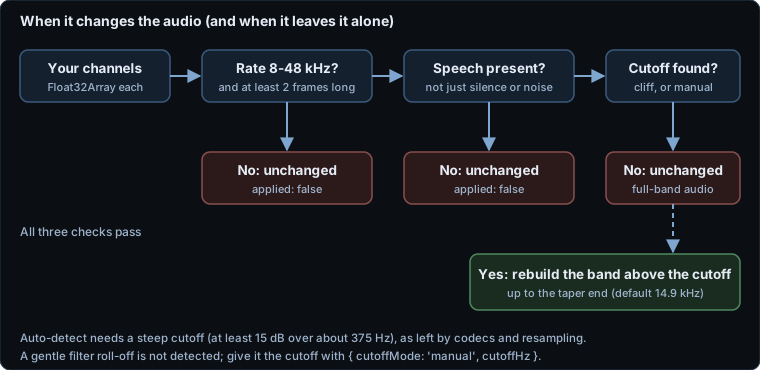
A tool like this is only as trustworthy as its willingness to leave things alone. If a clip is already full-band, is mostly silence or noise, is very short, has a sample rate outside 8 to 48 kHz, or has no steep cutoff, you get your input back (the very same arrays, with a reason). Only when all the checks pass does it rebuild anything.
The numbers
Measured in Node 24 on one Windows PC, on a synthetic, seeded voice-like signal (vowel-like formants plus fricative-like noise); npm run measure in the repository regenerates every number and figure here. The setup: a wideband original is cut with an ideal low-pass at a known frequency, processed, and compared with the original.
| Case | Cutoff found | Result |
|---|---|---|
| 48 kHz, ideal cut at 8 kHz | 7.8 kHz | 9–14 kHz band rebuilt to about −71 dB (original −58 dB, after the cut −157 dB). Log-spectral distance to the original in that band: 91.5 dB before, 12.1 dB after |
| 16 kHz, ideal cut at 3.8 kHz | 3.6 kHz | 4.3–7 kHz band rebuilt to about −78 dB (original −60 dB, after the cut −172 dB). Distance 101.0 dB before, 15.1 dB after |
| 48 kHz, gentle roll-off at 8 kHz | not found (auto) | With the cutoff supplied by hand: 36.2 dB before, 13.1 dB after |
| Full-band signal, or noise only | none | Returned untouched |
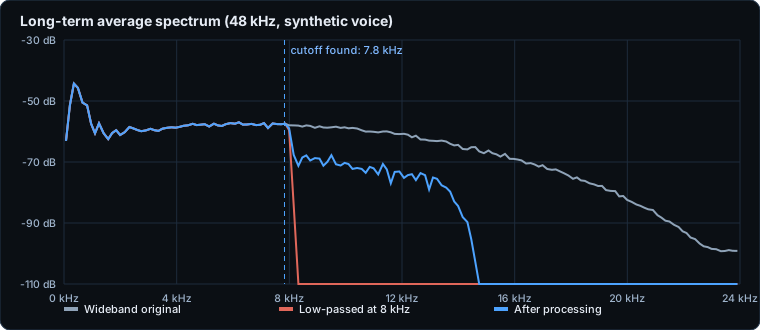
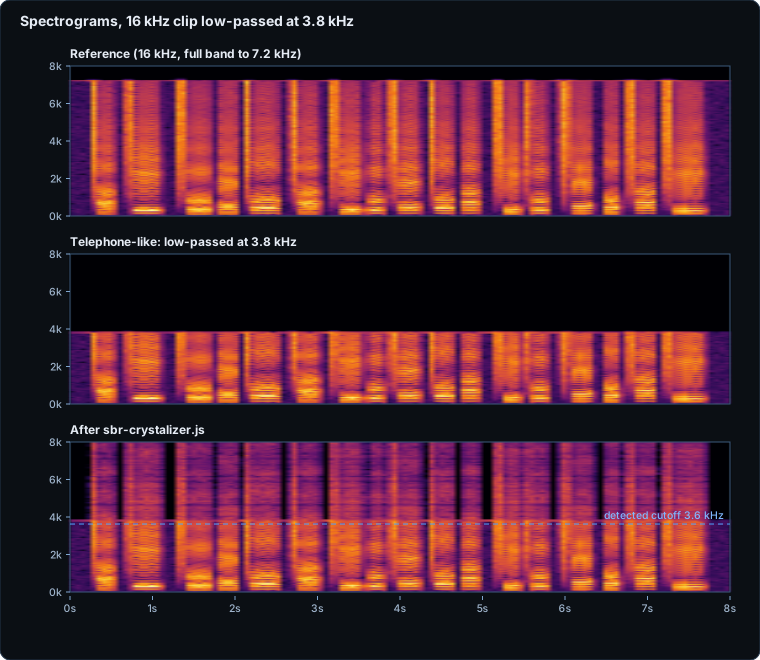
- Below the cutoff the audio is unchanged: mean absolute difference 0.0002 dB (48 kHz) and 0.0013 dB (16 kHz).
- Deterministic: processing a clip twice gives identical samples, and identical left and right channels stay identical.
- Speed: about 270 ms for 10 s of mono at 48 kHz, about 85 ms at 16 kHz.
- Size: about 16 KB with licence and comments, about 11 KB stripped of comments, 6.3 KB gzipped as shipped (about 4.1 KB stripped and gzipped).
Log-spectral distance says how close the spectral envelope is to the original; it does not say how it sounds. We have not run a listening test.
How we tested it — and what we have not
The repository has 23 automated checks that run both in the browser (test.html) and in Node (npm test) on seeded synthetic signals: cutoff detection, gain above the cutoff, a transparent region below it, input arrays left unmodified, determinism, stereo behaviour, pass-through for noise, silence, short clips, bad sample rates and empty input, manual cutoff, double-rate output, the yield hook and abort signals, and that the ES module matches the script build. All pass.
The honest limits: it is for speech, and we do not recommend it for music, because the new band is a speech-shaped noise fill. Auto-detection needs a steep cutoff, so a gentle filter roll-off is missed (give it the cutoff by hand). It handles one fixed cutoff per clip. It does not denoise or equalise anything, and it cannot undo clipping or distortion. We tested in Node and Chromium on synthetic voice only. And “SBR” is also the name of a tool inside HE-AAC; this library is not an HE-AAC or MPEG implementation and shares no code with any codec, but we have not done a patent search.
Download
The source is on GitHub: github.com/dialersapps/sbr-crystalizer (issues and pull requests welcome). The downloads below are plain files with nothing to build, no tracking and no outside requests:
- sbr-crystalizer-1.0.0.zip — everything in one file (library, ES module, demo, tests, measurement tools, figures, README, licence)
- sbr-crystalizer.js — the library (plain script tag,
require()and Workers) - sbr-crystalizer.mjs — the same code as an ES module
- demo.html — try it on your own recording (everything stays in your browser)
- test.html — the in-browser test suite
- README.md — API, options, limits
- LICENSE — MIT, copyright Dialer's Apps 2026
The code was written by Dialer's Apps from general signal-processing knowledge; it contains no code copied from another project.